http://groups.google.com/group/sci.electronics.repair?hl=en
sci.electronics.repair@googlegroups.com
Today's topics:
* Another reason to hate CFLs ... - 2 messages, 2 authors
http://groups.google.com/group/sci.electronics.repair/t/87ea27a2579f0316?hl=en
* OT: UK BBC4 TV tonight - 1 messages, 1 author
http://groups.google.com/group/sci.electronics.repair/t/47090447edcbd5bb?hl=en
* Testing SMPS Video - 2 messages, 2 authors
http://groups.google.com/group/sci.electronics.repair/t/1cc72f0926af56cc?hl=en
* Smoke detector testing - 7 messages, 6 authors
http://groups.google.com/group/sci.electronics.repair/t/6ef9dd7cb94ece9a?hl=en
* Panasonic Plasmas/LCDs of Past 5 years - "Volume Leveler" Function - 7
messages, 3 authors
http://groups.google.com/group/sci.electronics.repair/t/192fcec79e92313a?hl=en
* OT: Is this question too challenging for a BSEE graduate? - 5 messages, 4
authors
http://groups.google.com/group/sci.electronics.repair/t/31ba2b6a402a3720?hl=en
* How to Spot Cracks in PCB - 2 messages, 2 authors
http://groups.google.com/group/sci.electronics.repair/t/05acdc98fc4768f3?hl=en
==============================================================================
TOPIC: Another reason to hate CFLs ...
http://groups.google.com/group/sci.electronics.repair/t/87ea27a2579f0316?hl=en
==============================================================================
== 1 of 2 ==
Date: Tues, Oct 26 2010 12:39 am
From: "N_Cook"
Jeff Liebermann <jeffl@cruzio.com> wrote in message
news:8no8c6pc1ep3atfd6fv2rt37t0of39ti7r@4ax.com...
> On Sun, 24 Oct 2010 09:50:24 +0100, "N_Cook" <diverse@tcp.co.uk>
> wrote:
>
> >These days fibre reinforced plastic or mineralised plastic, used to be
> >ceramic in the original ones,
>
> Reinforced Polybutylene Terephthalate (PBT) or Polyethylene
> Terephthalate (PET) plastic resin with about 30% glass fiber mixed in
> to minimally meet UL-94 V-0 flame retartent specs.
>
> MSDS for CFL from Home Despot:
>
<http://www.homedepot.com/catalog/pdfImages/fd/fd8f96e1-4ff3-4a86-9070-e8583
d3e636e.pdf>
>
> >Googling for BU102 + TO92 gets nowhere, I
> >assume as diac in there then triacs
>
> What's inside and how it works:
> "Self Oscillating 25W CFL Lamp Circuit"
> <http://www.nxp.com/documents/application_note/AN00048.pdf>
>
> Fiat Lux
> (let there be light).
>
> --
> Jeff Liebermann jeffl@cruzio.com
> 150 Felker St #D http://www.LearnByDestroying.com
> Santa Cruz CA 95060 http://802.11junk.com
> Skype: JeffLiebermann AE6KS 831-336-2558
Returning to that Philips application note
I can only find SOT533 version of BUJ101AU, eg
http://www.datasheetcatalog.org/datasheet/philips/BUJ101AU.pdf
a power transistor format rather than TO92 format with 1.5A/3A : 400V/700V
rating , perhaps for this specific use and known peak/av duty cycle then
could be packaged in TO92
== 2 of 2 ==
Date: Tues, Oct 26 2010 5:06 am
From: Tim Schwartz
On 10/25/2010 10:10 AM, Geoffrey S. Mendelson wrote:
> Tim Schwartz wrote:
>> I feel that the quoted lumens of the CFL's is for a 'young' bulb and
>> that the fall off is quite rapid. If I had to take a guess on my
>> hallway light, I would say that at 2000 hours the lamp was down to 40%
>> of its original output.
>
> You might think that, but in many cases you would be wrong. When I recently
> replaced a year old Osram brand CFL with another of the same wattage, I
> noticed immediately it was much brighter.
>
> Then I looked at the old lamp and the box for the new one. The old one was
> rated 2/3s of the lumens of the new one.
>
> So in this case, and will all of the osram lamps we bought that day (we bought
> several in different sizes and wattages) they were much brighter by design than
> the ones just a year old.
>
> What I want to see is a long necked refrigerator bulb. :-)
>
> Geoff.
>
Geoff,
One point you missed about my comment on light output is that the lamps
were from the same package, bought on the same day. One of them just
sat on my shelf for a year.
Best regards,
Tim
==============================================================================
TOPIC: OT: UK BBC4 TV tonight
http://groups.google.com/group/sci.electronics.repair/t/47090447edcbd5bb?hl=en
==============================================================================
== 1 of 1 ==
Date: Tues, Oct 26 2010 5:57 am
From: "N_Cook"
History of the National Grid, no idea about i-player+freeview
channels+foreign IP/proxies.
I wonder if they will nail the story I've never seen confirmed anywhere . In
early days each power station supplied a local area with the the chance to
link across to a neighbouring grid in times of heavy useage. No one dared
hook up 3 or more grids due to concerns over current hogging/ burnouts or
something. Anyway middle of the night sometime a lowly technician decided,
for a wheeze, to link loads of these separate grids together and nothing
untoward happened.
==============================================================================
TOPIC: Testing SMPS Video
http://groups.google.com/group/sci.electronics.repair/t/1cc72f0926af56cc?hl=en
==============================================================================
== 1 of 2 ==
Date: Tues, Oct 26 2010 8:22 am
From: "Michael Kennedy"
"Meat Plow" <mhywatt@yahoo.com> wrote in message
news:pan.2010.10.24.17.16.02@lmao.lol.lol...
> On Mon, 25 Oct 2010 00:14:19 +0900, Michael Kennedy wrote:
>
>> Here is a video of this thing clicking while warming up and cooling off.
>>
>> http://www.youtube.com/watch?v=ckW8XSZ7T4A
>>
>> http://www.youtube.com/watch?v=urx3JrsxFmo
>>
>> I have gone through this thing with my ESR meter and havent found any
>> bad caps. I changed some suspect caps because of their location near hot
>> resistors. To make things more difficult the inside of this tv is
>> coated with cigarrette tar... So some caps and things look blackened but
>> in reality its form smoke residue..
>>
>>
>> by the way thank you everyone who has made a suggestion on this. I am
>> very thankful everyone here is so supportive to amatures like myself..
>
> My 32" LCD makes all kind of clicking noises while it warms up and
> especially when it cools off after it is shut off. But it is mechanical
> noise from the expansion and contraction of heated surfaces. Are you sure
> you're not hearing some of this?
>
>
Hmm.. It is very possible the noise is expansion and contraction noise,
although it
can be very loud. When I first heard it I thought it was fairly big relay
clicking. I was unaware that plasmas usually make noise since this is my
first experience with the technology.
Since I became less focused on the clicking and more on looking for the
problem I believe that I have solved the problem. After thourghouly checking
the PSU and noticing that it wouldnt run without an OK signal from the X-sus
board I decided to give the X-sus a once over again.
I found a 1uF 50v mini alunimum cap that had an ESR of 9ohms. It is
attached to an M3356 transistor. The board also has solder landing pads for
a SMD ceramic cap which was not populated. I think it would have been a
better choice becasue IME these small aluminum caps seem to go high in ESR
quite easily.
The only bad caps I've found in this thing have been 1uF on the Y-sus board
and X-sus. Changed the Y-sus caps before without any improvement.
Anyhow.. I would like to thank everyone for all of their suggestions and
advice. I hope that this thing is fixed now. I guess thats the challenging
part about intermittant failures.. You don't really know if its fixed or not
unitl it stops working again..
- Mike
== 2 of 2 ==
Date: Tues, Oct 26 2010 10:05 am
From: "Ian Field"
"Michael Kennedy" <mike@nospam.com> wrote in message
news:t6WdnfsKs9u9b1vRnZ2dnVY3go-dnZ2d@giganews.com...
>
> "Meat Plow" <mhywatt@yahoo.com> wrote in message
> news:pan.2010.10.24.17.16.02@lmao.lol.lol...
>> On Mon, 25 Oct 2010 00:14:19 +0900, Michael Kennedy wrote:
>>
>>> Here is a video of this thing clicking while warming up and cooling off.
>>>
>>> http://www.youtube.com/watch?v=ckW8XSZ7T4A
>>>
>>> http://www.youtube.com/watch?v=urx3JrsxFmo
>>>
>>> I have gone through this thing with my ESR meter and havent found any
>>> bad caps. I changed some suspect caps because of their location near hot
>>> resistors. To make things more difficult the inside of this tv is
>>> coated with cigarrette tar... So some caps and things look blackened but
>>> in reality its form smoke residue..
>>>
>>>
>>> by the way thank you everyone who has made a suggestion on this. I am
>>> very thankful everyone here is so supportive to amatures like myself..
>>
>> My 32" LCD makes all kind of clicking noises while it warms up and
>> especially when it cools off after it is shut off. But it is mechanical
>> noise from the expansion and contraction of heated surfaces. Are you sure
>> you're not hearing some of this?
>>
>>
>
> Hmm.. It is very possible the noise is expansion and contraction noise,
> although it
> can be very loud. When I first heard it I thought it was fairly big relay
> clicking. I was unaware that plasmas usually make noise since this is my
> first experience with the technology.
>
> Since I became less focused on the clicking and more on looking for the
> problem I believe that I have solved the problem. After thourghouly
> checking the PSU and noticing that it wouldnt run without an OK signal
> from the X-sus board I decided to give the X-sus a once over again.
>
> I found a 1uF 50v mini alunimum cap that had an ESR of 9ohms. It is
> attached to an M3356 transistor. The board also has solder landing pads
> for a SMD ceramic cap which was not populated. I think it would have been
> a better choice becasue IME these small aluminum caps seem to go high in
> ESR quite easily.
You're right on the money there, the smaller the electro (physical size) the
more likely it is to go high ESR - higher voltage types even more so!
Shouldn't be too hard to find a non-electrolytic 1uF that fits in the space,
or have a rummage for any forgotten about very old HDDs - they can be a good
source of large value multilayer ceramic chip capacitors.
==============================================================================
TOPIC: Smoke detector testing
http://groups.google.com/group/sci.electronics.repair/t/6ef9dd7cb94ece9a?hl=en
==============================================================================
== 1 of 7 ==
Date: Tues, Oct 26 2010 8:34 am
From: klem kedidelhopper
We do fire alarm system inspections. To test smoke detectors we use a
spray can which contains an inocuous compound.. When sprayed a few
feet below a smoke detector it emits a mist which temporarily obstucts
the sense chamber in a photoelectic detector and sets it off. The mist
quickly clears and the detector returns to quiescent conditions.
I recently offered to do annual testing for the local church and
synagogue in town as a donation. Both sanctuaries have high cathedral
ceilings. The detectors cannot be reached even from ladders. I have
learned that there is an extention pole assembly with a clamp on the
end to hold the spray can. The basic kit takes you up to 10 feet. Then
you add extention poles after that. The nozzle of the can is operated
by way of a cable or linkage through the hollow fiberglass pole from
below and sprays the can. I don't mind donating my time however buying
the equipment which is needed to reach these detectors in the
sanctuaries in both buildings will cost me over 400.00
I was thinking of trying to adapt something but I'm not sure what. I
was wondering if this has ever come up in any other trade that someone
may know of. Any advice will be most sincerely appreciated. Lenny.
== 2 of 7 ==
Date: Tues, Oct 26 2010 8:48 am
From: D Yuniskis
Hi Lenny,
klem kedidelhopper wrote:
> We do fire alarm system inspections. To test smoke detectors we use a
> spray can which contains an inocuous compound.. When sprayed a few
> feet below a smoke detector it emits a mist which temporarily obstucts
> the sense chamber in a photoelectic detector and sets it off. The mist
> quickly clears and the detector returns to quiescent conditions.
> I recently offered to do annual testing for the local church and
> synagogue in town as a donation. Both sanctuaries have high cathedral
> ceilings. The detectors cannot be reached even from ladders. I have
> learned that there is an extention pole assembly with a clamp on the
> end to hold the spray can. The basic kit takes you up to 10 feet. Then
> you add extention poles after that. The nozzle of the can is operated
> by way of a cable or linkage through the hollow fiberglass pole from
> below and sprays the can. I don't mind donating my time however buying
> the equipment which is needed to reach these detectors in the
> sanctuaries in both buildings will cost me over 400.00
> I was thinking of trying to adapt something but I'm not sure what. I
> was wondering if this has ever come up in any other trade that someone
> may know of. Any advice will be most sincerely appreciated. Lenny.
I assume by "spray can" you mean "aerosol" -- like a woman's
hair spray? (i.e., button on top that your fingertip depresses
to release the contents of the can)
What's the ceiling made out of (wallboard, wood, etc.)?
Could you firmly affix can to *a* pole (wooden dowel, aluminum
rod, etc.) and simply press it up *against* the ceiling (hence
my concern over what the ceiling is made of -- lest you mark
or damage it in the process) with its nozzle pointed towards the
smoke detector?
Alternatively, a tree pruning saw (the sort that uses a telescoping
fiberglass pole -- $40 at Home Despot) with saw blade removed and
can affixed below the "chopping blade" (different from the *saw*
blade) so that tugging on the rope pulls the actuating lever down
onto the spray can "button" (?)
== 3 of 7 ==
Date: Tues, Oct 26 2010 8:44 am
From: Jeffrey Angus
On 10/26/2010 10:34 AM, klem kedidelhopper wrote:
I don't mind donating my time however buying
> the equipment which is needed to reach these detectors in the
> sanctuaries in both buildings will cost me over 400.00
Go to a paint store or Home Depot and get a painter's extension
pole. And a 4-6" strap hinge. Duct tape the can near the top of
the pole along with the hinge so it lays over the push button on
the can, use a string to pull the hinge and push the button.
Make believe you're tagging your favorite freeway over pass.
Jeff
== 4 of 7 ==
Date: Tues, Oct 26 2010 9:58 am
From: Jeff Liebermann
On Tue, 26 Oct 2010 08:34:16 -0700 (PDT), klem kedidelhopper
<captainvideo462009@gmail.com> wrote:
>I don't mind donating my time however buying
>the equipment which is needed to reach these detectors in the
>sanctuaries in both buildings will cost me over 400.00
Nice of you to leave off the necessary length for the extension pole.
Cathedral ceiling?
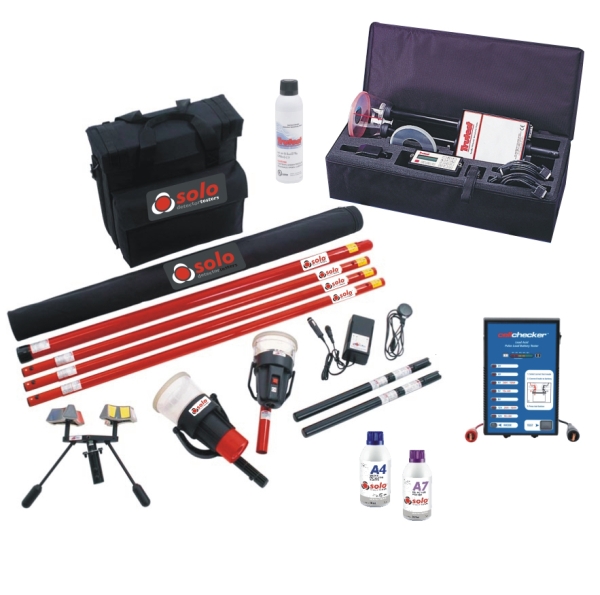
Yeah, the pro kit can cost $400.
<http://www.brooksequipment.com/Fire_Alarm_Products/Fire_Alarm_Inspection%2C_Testing_and_Maintenance_Products/Smoke_Detector_Testing/SOLO>
<http://www.brooksequipment.com/images/products/600/SOLOST1.jpg>
<http://www.brooksequipment.com/Fire_Alarm_Products/Fire_Alarm_Inspection,_Testing_and_Maintenance_Products/Smoke_Detector_Testing>
According to some friends in the fire alarm biz, the problem is
blowing the dust out of the smoke detector before running the test.
>I was thinking of trying to adapt something but I'm not sure what. I
>was wondering if this has ever come up in any other trade that someone
>may know of. Any advice will be most sincerely appreciated. Lenny.
I use a 3 section fiberglass extension pole that's about 20ft long.
About $60. (Very handy for antenna tests). Over 20ft long, they get
kinda pricey. At 40ft, the aluminum versions are about $120.
You can get all manner of adapters for the top, including one for
spray cans.
<http://www.amazon.com/Spray-Close-6001-Extender/dp/B0014HBQLA>
<http://www.gotchasprayer.com>
<http://www.gotchasprayer.com/GotchaSprayerPro.htm>
Note that under "applications" it lists "smoke detector testing".
Smoke Check spray is about $10/can.
As an alternative, it might be easier to keep the can on the ground,
and simply project the spray. Get a 20ft long soda straw or
equivalent, attach it to the can nozzle, and spray from the ground. If
you need additional lift, use an air compressor to help move the spray
contents towards the ceiling.
See if this gives you any ideas:
<http://www.waynesthisandthat.com/airblasters.html>
Fill the Wham-o Air Blaster with some magic smoke liquid, and fire
away.
If you're really cheap, fill a zip lock bag with a blast of your magic
spray. Attach it to a mouse trap. Attach to the fiberglass extension
pole. Connect a string as a trigger mechanism. When in the vicinity
of the smoke alarm, pull on the string, which springs the mouse trap,
which will pop the bag, and release the contents. Rube Goldberg would
be proud.
If you're avionically incline, purchase a remote control electric
helicopter and have a it drag a plastic bag full of the magic smoke
near the smoke alarm. Puncture the bag with whatever mechanism is
available. While not as practical as the other suggestions, this
might be the most fun. If too technically challenging, a helium
balloon on a string might provide the necessary lift. Use a laser or
dart gun from the ground to puncture the bag.
Ummm... this has what to do with electronic repair?
--
Jeff Liebermann jeffl@cruzio.com
150 Felker St #D http://www.LearnByDestroying.com
Santa Cruz CA 95060 http://802.11junk.com
Skype: JeffLiebermann AE6KS 831-336-2558
== 5 of 7 ==
Date: Tues, Oct 26 2010 10:08 am
From: Ron
On 26/10/2010 17:58, Jeff Liebermann wrote:
> On Tue, 26 Oct 2010 08:34:16 -0700 (PDT), klem kedidelhopper
> <captainvideo462009@gmail.com> wrote:
>
>> I don't mind donating my time however buying
>> the equipment which is needed to reach these detectors in the
>> sanctuaries in both buildings will cost me over 400.00
>
> Nice of you to leave off the necessary length for the extension pole.
> Cathedral ceiling?
>
> Yeah, the pro kit can cost $400.
> <http://www.brooksequipment.com/Fire_Alarm_Products/Fire_Alarm_Inspection%2C_Testing_and_Maintenance_Products/Smoke_Detector_Testing/SOLO>
> <http://www.brooksequipment.com/images/products/600/SOLOST1.jpg>
> <http://www.brooksequipment.com/Fire_Alarm_Products/Fire_Alarm_Inspection,_Testing_and_Maintenance_Products/Smoke_Detector_Testing>
> According to some friends in the fire alarm biz, the problem is
> blowing the dust out of the smoke detector before running the test.
>
>> I was thinking of trying to adapt something but I'm not sure what. I
>> was wondering if this has ever come up in any other trade that someone
>> may know of. Any advice will be most sincerely appreciated. Lenny.
>
> I use a 3 section fiberglass extension pole that's about 20ft long.
> About $60. (Very handy for antenna tests). Over 20ft long, they get
> kinda pricey. At 40ft, the aluminum versions are about $120.
>
> You can get all manner of adapters for the top, including one for
> spray cans.
> <http://www.amazon.com/Spray-Close-6001-Extender/dp/B0014HBQLA>
> <http://www.gotchasprayer.com>
> <http://www.gotchasprayer.com/GotchaSprayerPro.htm>
> Note that under "applications" it lists "smoke detector testing".
> Smoke Check spray is about $10/can.
>
> As an alternative, it might be easier to keep the can on the ground,
> and simply project the spray. Get a 20ft long soda straw or
> equivalent, attach it to the can nozzle, and spray from the ground. If
> you need additional lift, use an air compressor to help move the spray
> contents towards the ceiling.
>
> See if this gives you any ideas:
> <http://www.waynesthisandthat.com/airblasters.html>
> Fill the Wham-o Air Blaster with some magic smoke liquid, and fire
> away.
>
> If you're really cheap, fill a zip lock bag with a blast of your magic
> spray. Attach it to a mouse trap. Attach to the fiberglass extension
> pole. Connect a string as a trigger mechanism. When in the vicinity
> of the smoke alarm, pull on the string, which springs the mouse trap,
> which will pop the bag, and release the contents. Rube Goldberg would
> be proud.
>
> If you're avionically incline, purchase a remote control electric
> helicopter and have a it drag a plastic bag full of the magic smoke
> near the smoke alarm. Puncture the bag with whatever mechanism is
> available. While not as practical as the other suggestions, this
> might be the most fun. If too technically challenging, a helium
> balloon on a string might provide the necessary lift. Use a laser or
> dart gun from the ground to puncture the bag.
>
> Ummm... this has what to do with electronic repair?
Or you could just tie a bit of smouldering rope/rag/cigar/other
combustible to the end of a long pole...
== 6 of 7 ==
Date: Tues, Oct 26 2010 11:29 am
From: David Nebenzahl
On 10/26/2010 10:08 AM Ron spake thus:
> On 26/10/2010 17:58, Jeff Liebermann wrote:
>
>> As an alternative, it might be easier to keep the can on the
>> ground, and simply project the spray. Get a 20ft long soda straw or
>> equivalent, attach it to the can nozzle, and spray from the
>> ground. If you need additional lift, use an air compressor to help
>> move the spray contents towards the ceiling.
>
> Or you could just tie a bit of smouldering rope/rag/cigar/other
> combustible to the end of a long pole...
... and hope the smoldering stuff doesn't get caught on something
combustible attached to the ceiling and set the damn church on fire.
Have you ever been at the bottom of a 40-foot pole with a weight on the
top, trying to guide it somewhere? It ain't easy.
--
The fashion in killing has an insouciant, flirty style this spring,
with the flaunting of well-defined muscle, wrapped in flags.
- Comment from an article on Antiwar.com (http://antiwar.com)
== 7 of 7 ==
Date: Tues, Oct 26 2010 11:35 am
From: D Yuniskis
Ron wrote:
[snip]
> Or you could just tie a bit of smouldering rope/rag/cigar/other
> combustible to the end of a long pole...
+42
==============================================================================
TOPIC: Panasonic Plasmas/LCDs of Past 5 years - "Volume Leveler" Function
http://groups.google.com/group/sci.electronics.repair/t/192fcec79e92313a?hl=en
==============================================================================
== 1 of 7 ==
Date: Tues, Oct 26 2010 9:04 am
From: "Wild_Bill"
You may have more success than others, but in my experience audio output
levels will most likely vary widely from various different sources of input
levels.
This has apparently been too complex of a problem for the electronics
industry to standardize for over 40 years.
A standard for "line level" amplitudes has been established long ago, but
that doesn't seem to be of any help.
My most recent purchase was a cheap LCD TV, and not surprisingly, the normal
volume range when watching TV is only barely audible when the source is a
DVD player (various brands) or other AV sources.
So, when watching a DVD.. before changing the source to TV, I need to reduce
the volume level to near zero.
The same differences are generally to be expected when changing sources such
as tuner to recorded audio from any receiver/amplifier I've ever owned.
There are standards, but they seem to be ignored.. the local CBS channel's
audio has been significantly higher than any other channels for decades.
--
Cheers,
WB
.............
"ChrisCoaster" <ckozicki@snet.net> wrote in message
news:3d788b61-5483-49a9-b21a-e79b5da5aaef@30g2000yql.googlegroups.com...
On Oct 25, 12:53 pm, "Arfa Daily" <arfa.da...@ntlworld.com> wrote:
> "ChrisCoaster" <ckozi...@snet.net> wrote in message
>
> news:a293e97a-1746-4951-9a54-4c46d7469f17@p26g2000yqb.googlegroups.com...
>
>
>
>
>
> > Where to set the damn thing?!?! (Sorry if I posted this in wrong
> > N.G.)
>
> > I've scrounged everywhere including Panasonic's own website for
> > instructions on where to set the Volume Leveler in the audio section
> > of most current(2006 & up) flat-panel consumer Panasonic TVs.
>
> > At their website, you can download any PDF manual for any Panasonic TV
> > as long as it's from the year 2003 or earlier(!)
>
> > At the websites offering free downloads of manuals up to last
> > year(basically current), you see the actual Panasonic manual but it
> > describes only what the function does - not where to set it! I know
> > what a volume leveler is - basically a limiter, but the setting on
> > Panasonic TVs has at least 5-7 positions.
>
> > I would appreciate anyone's help on this, particularly if you own a
> > recent model Panny LCD/Plasma and know where to set it to best effect.
>
> > Just not being able to find this out from the company itself is enough
> > of a turnoff and I will not be buying a Pansonic brand TV for any room
> > in my home anytime soon. To me, support is as important as the
> > quality of the product, and since Panny failed in that regard, they
> > have lost my business in the TV segment.
>
> > -CC
>
> On my Panasonic TX50U10 plas just under a year old, the function you
> appear
> to be looking for is called "Volume Correction", and is accessed from
> "MAIN
> MENU" > "SOUND" > "SOUND MENU" and then 7th item down ( Mode, Bass,
> Treble, Balance, Headphone Volume, Surround, VOLUME CORRECTION, Speaker
> Distance to Wall, Preferred Multi Audio ).
>
> Under the function's description in the (extremely good as it happens)
> user
> manual, it says " Adjusts the volume of individual channel or input mode"
>
> Would that be the one ?
>
> Arfa- Hide quoted text -
>
> - Show quoted text -
__________________________
CLOSE - and you're the only one who figured out what I'm talking
about. It is called "Volume Leveler" on my friends' set(a 2008
model). In all the instruction manuals I looked at online they just
describe WHAT IT DOES but NOT what different levels of adjusting it
does. If I recall on my friends' Panasonic it's a sliding scale
adjustment from left +3 to right -10, with Zero the factory default.
It is a user menu adjustment, just as you stated, in the audio section
of the user menus.
I'm ASSUMING that moving it to the right "levels" the loudest sounds
down to the average(or softer volumes) so there is less difference,
acc to the manual, "between input sources".
-CC
== 2 of 7 ==
Date: Tues, Oct 26 2010 10:04 am
From: Meat Plow
On Tue, 26 Oct 2010 12:04:08 -0400, Wild_Bill wrote:
> You may have more success than others, but in my experience audio output
> levels will most likely vary widely from various different sources of
> input levels.
>
> This has apparently been too complex of a problem for the electronics
> industry to standardize for over 40 years.
>
> A standard for "line level" amplitudes has been established long ago,
> but that doesn't seem to be of any help.
>
> My most recent purchase was a cheap LCD TV, and not surprisingly, the
> normal volume range when watching TV is only barely audible when the
> source is a DVD player (various brands) or other AV sources. So, when
> watching a DVD.. before changing the source to TV, I need to reduce the
> volume level to near zero.
>
> The same differences are generally to be expected when changing sources
> such as tuner to recorded audio from any receiver/amplifier I've ever
> owned.
>
> There are standards, but they seem to be ignored.. the local CBS
> channel's audio has been significantly higher than any other channels
> for decades.
The audio "leveling" range of my Scientific Atlanta HD 82xx series DVR is
pathetic when programing is watched via RF connection. Now that I have a
decent HD set it's hooked up via HDMI. Audio goes via optical to a Sony
5.1 capable of auto-sensing and decoding in Pro Logic II or Dolby
Digital. Speaker configuration is 3.2.1 with a 100 watts on each channel
and 150 watt 12" powered sub. The sub is connected via RF SPDIF. Front,
center and surround speakers are all Infinity. I don't watch much TV but
when I do I like to enjoy it.
One funny thing I've found out about the DVR is when an HDMI cable is
inserted it disables the video for the other outputs, Component,
Composite, and RF UNLESS the set the HDMI cable is plugged into is turned
on! What nonsense is that? So if I want to watch the set in my bedroom
which is on the RF out of the DVR I have to either unplug the HDMI or
turn the living room set on lest I get only audio and the following
message on the screen:
Your TV does not allow display of this program through the DVI input
source. Please choose another source.
Does this make any sense?
--
Live Fast, Die Young and Leave a Pretty Corpse
== 3 of 7 ==
Date: Tues, Oct 26 2010 10:14 am
From: "Arfa Daily"
>
> "ChrisCoaster" <ckozicki@snet.net> wrote in message
> news:3d788b61-5483-49a9-b21a-e79b5da5aaef@30g2000yql.googlegroups.com...
> On Oct 25, 12:53 pm, "Arfa Daily" <arfa.da...@ntlworld.com> wrote:
>> "ChrisCoaster" <ckozi...@snet.net> wrote in message
>>
>> news:a293e97a-1746-4951-9a54-4c46d7469f17@p26g2000yqb.googlegroups.com...
>>
>>
>>
>>
>>
>> > Where to set the damn thing?!?! (Sorry if I posted this in wrong
>> > N.G.)
>>
>> > I've scrounged everywhere including Panasonic's own website for
>> > instructions on where to set the Volume Leveler in the audio section
>> > of most current(2006 & up) flat-panel consumer Panasonic TVs.
>>
>> > At their website, you can download any PDF manual for any Panasonic TV
>> > as long as it's from the year 2003 or earlier(!)
>>
>> > At the websites offering free downloads of manuals up to last
>> > year(basically current), you see the actual Panasonic manual but it
>> > describes only what the function does - not where to set it! I know
>> > what a volume leveler is - basically a limiter, but the setting on
>> > Panasonic TVs has at least 5-7 positions.
>>
>> > I would appreciate anyone's help on this, particularly if you own a
>> > recent model Panny LCD/Plasma and know where to set it to best effect.
>>
>> > Just not being able to find this out from the company itself is enough
>> > of a turnoff and I will not be buying a Pansonic brand TV for any room
>> > in my home anytime soon. To me, support is as important as the
>> > quality of the product, and since Panny failed in that regard, they
>> > have lost my business in the TV segment.
"Wild_Bill" <wb_wildbill@XSPAMyahoo.com> wrote in message
news:%ZCxo.276331$Qg.253454@en-nntp-04.dc1.easynews.com...
> You may have more success than others, but in my experience audio output
> levels will most likely vary widely from various different sources of
> input levels.
>
> This has apparently been too complex of a problem for the electronics
> industry to standardize for over 40 years.
>
> A standard for "line level" amplitudes has been established long ago, but
> that doesn't seem to be of any help.
>
> My most recent purchase was a cheap LCD TV, and not surprisingly, the
> normal volume range when watching TV is only barely audible when the
> source is a DVD player (various brands) or other AV sources.
> So, when watching a DVD.. before changing the source to TV, I need to
> reduce the volume level to near zero.
>
> The same differences are generally to be expected when changing sources
> such as tuner to recorded audio from any receiver/amplifier I've ever
> owned.
>
> There are standards, but they seem to be ignored.. the local CBS channel's
> audio has been significantly higher than any other channels for decades.
>
> --
> Cheers,
> WB
> .............
>
But this is the whole point of the manufacturers including the setting that
the OP is trying to use ...
Arfa
== 4 of 7 ==
Date: Tues, Oct 26 2010 10:31 am
From: "Wild_Bill"
So far, I haven't seen that any users of that brand/feature state that it
does function as they want it to.
If it does, great. That info would be very worthwhile to know, if the OP
and/or others can confirm it, yes?
--
Cheers,
WB
.............
"Arfa Daily" <arfa.daily@ntlworld.com> wrote in message
news:_%Dxo.11816$gN7.4348@newsfe12.ams2...
>
>
> But this is the whole point of the manufacturers including the setting
> that the OP is trying to use ...
>
> Arfa
== 5 of 7 ==
Date: Tues, Oct 26 2010 10:32 am
From: "Arfa Daily"
"ChrisCoaster" <ckozicki@snet.net> wrote in message
news:3d788b61-5483-49a9-b21a-e79b5da5aaef@30g2000yql.googlegroups.com...
> On Oct 25, 12:53 pm, "Arfa Daily" <arfa.da...@ntlworld.com> wrote:
>> "ChrisCoaster" <ckozi...@snet.net> wrote in message
>>
>> news:a293e97a-1746-4951-9a54-4c46d7469f17@p26g2000yqb.googlegroups.com...
>>
>>
>>
>>
>>
>> > Where to set the damn thing?!?! (Sorry if I posted this in wrong
>> > N.G.)
>>
>> > I've scrounged everywhere including Panasonic's own website for
>> > instructions on where to set the Volume Leveler in the audio section
>> > of most current(2006 & up) flat-panel consumer Panasonic TVs.
>>
>> > At their website, you can download any PDF manual for any Panasonic TV
>> > as long as it's from the year 2003 or earlier(!)
>>
>> > At the websites offering free downloads of manuals up to last
>> > year(basically current), you see the actual Panasonic manual but it
>> > describes only what the function does - not where to set it! I know
>> > what a volume leveler is - basically a limiter, but the setting on
>> > Panasonic TVs has at least 5-7 positions.
>>
>> > I would appreciate anyone's help on this, particularly if you own a
>> > recent model Panny LCD/Plasma and know where to set it to best effect.
>>
>> > Just not being able to find this out from the company itself is enough
>> > of a turnoff and I will not be buying a Pansonic brand TV for any room
>> > in my home anytime soon. To me, support is as important as the
>> > quality of the product, and since Panny failed in that regard, they
>> > have lost my business in the TV segment.
>>
>> > -CC
>>
>> On my Panasonic TX50U10 plas just under a year old, the function you
>> appear
>> to be looking for is called "Volume Correction", and is accessed from
>> "MAIN
>> MENU" > "SOUND" > "SOUND MENU" and then 7th item down ( Mode, Bass,
>> Treble, Balance, Headphone Volume, Surround, VOLUME CORRECTION, Speaker
>> Distance to Wall, Preferred Multi Audio ).
>>
>> Under the function's description in the (extremely good as it happens)
>> user
>> manual, it says " Adjusts the volume of individual channel or input mode"
>>
>> Would that be the one ?
>>
>> Arfa- Hide quoted text -
>>
>> - Show quoted text -
> __________________________
>
> CLOSE - and you're the only one who figured out what I'm talking
> about. It is called "Volume Leveler" on my friends' set(a 2008
> model). In all the instruction manuals I looked at online they just
> describe WHAT IT DOES but NOT what different levels of adjusting it
> does. If I recall on my friends' Panasonic it's a sliding scale
> adjustment from left +3 to right -10, with Zero the factory default.
> It is a user menu adjustment, just as you stated, in the audio section
> of the user menus.
>
>
> I'm ASSUMING that moving it to the right "levels" the loudest sounds
> down to the average(or softer volumes) so there is less difference,
> acc to the manual, "between input sources".
>
> -CC
OK. I've just sat down and tried it out. On my TV, the setting is just a
'bar', not calibrated in any way. By default, it sits at halfway. Using the
remote left and right arrows, makes the bar shorter or longer - longer for
the right arrow, shorter for the left. As you go shorter, the currently set
volume reduces, and as you go right, it increases. This is without the
*actual* volume control changing, if you see what I mean. So lets say that
you have the 'real' volume control set at say 6 notches, and that 6 notches
gives an acceptable level on TV stations 1, 2 and 3, but is too loud on
station 4. With station 4 selected, and 6 notches set on the normal user
volume, you then go into the sound menu and down to the VOLUME CORRECTION
field, and then 'shorten' the bar until 4 notches of volume on this station,
sounds the same as 4 notches on the other stations. On exiting the menu,
your 'corrected' setting is saved for that station only. Likewise, if you
want to correct the level for any input other than the internal tuner. You
simply go to that input, set your volume to how you want it indicated on the
screen, then access the feature, and set the actual level to match all your
others. Again, on exit, this setting is saved for that AV input only,
independent of how you've set any other inputs or stations.
I would estimate, in the absence of any figures either in the manual or on
the display, that the range of this correction feature is around + / - 6dB.
By the looks of it, the volume leveler feature that you have does exactly
the same, but the opposite way round (left to increase, right to decrease)
to the feature on my TV, and perhaps with a slightly wider and asymmetric
range.
Arfa
== 6 of 7 ==
Date: Tues, Oct 26 2010 10:54 am
From: "Wild_Bill"
So much of what's designed into electronic gear today are just
needlessly-overcomplicated-design issues, IMO.
Smart machines to anticipate your desires, and scold you when they can't
function simply.
Thus my great appreciation of older equipment, which generally always
functions as the user wants it to.
All ya gotta do is.. set up an equipment rack beside your easy chair so that
the entertainment equipment function buttons and cable connections are
within reach. Include a pro-grade mixing console.
Roll it to other locations for remote use.
Probably easily implemented with an extra 3000 feet of cable added to the
house.
The obvious solution from a manufacturer's point of view would be that
everyone needs multiple separate systems for various locations within a
home.
--
Cheers,
WB
.............
"Meat Plow" <mhywatt@yahoo.com> wrote in message
news:pan.2010.10.26.17.03.26@lmao.lol.lol...
> On Tue, 26 Oct 2010 12:04:08 -0400, Wild_Bill wrote:
>
>
> The audio "leveling" range of my Scientific Atlanta HD 82xx series DVR is
> pathetic when programing is watched via RF connection. Now that I have a
> decent HD set it's hooked up via HDMI. Audio goes via optical to a Sony
> 5.1 capable of auto-sensing and decoding in Pro Logic II or Dolby
> Digital. Speaker configuration is 3.2.1 with a 100 watts on each channel
> and 150 watt 12" powered sub. The sub is connected via RF SPDIF. Front,
> center and surround speakers are all Infinity. I don't watch much TV but
> when I do I like to enjoy it.
>
> One funny thing I've found out about the DVR is when an HDMI cable is
> inserted it disables the video for the other outputs, Component,
> Composite, and RF UNLESS the set the HDMI cable is plugged into is turned
> on! What nonsense is that? So if I want to watch the set in my bedroom
> which is on the RF out of the DVR I have to either unplug the HDMI or
> turn the living room set on lest I get only audio and the following
> message on the screen:
>
> Your TV does not allow display of this program through the DVI input
> source. Please choose another source.
>
> Does this make any sense?
>
>
> --
> Live Fast, Die Young and Leave a Pretty Corpse
== 7 of 7 ==
Date: Tues, Oct 26 2010 11:10 am
From: Meat Plow
On Tue, 26 Oct 2010 13:54:03 -0400, Wild_Bill wrote:
> So much of what's designed into electronic gear today are just
> needlessly-overcomplicated-design issues, IMO.
>
> Smart machines to anticipate your desires, and scold you when they can't
> function simply.
>
> Thus my great appreciation of older equipment, which generally always
> functions as the user wants it to.
>
> All ya gotta do is.. set up an equipment rack beside your easy chair so
> that the entertainment equipment function buttons and cable connections
> are within reach. Include a pro-grade mixing console. Roll it to other
> locations for remote use. Probably easily implemented with an extra 3000
> feet of cable added to the house.
>
> The obvious solution from a manufacturer's point of view would be that
> everyone needs multiple separate systems for various locations within a
> home.
The provider TWC told me I wasn't using their provided HDMI cable which I
certainly am. The problem must lie in their DVR software. When HDMI
connected TV is turned on the DVR senses that and the auto resolution
adjust to whatever the program is being broadcast in also considering the
capability of the TV to display 1080 or not. It's a pain in the butt to
reach around the DVR which is in my audio rack and unplug the HDMI out
just so I can watch TV in my bedroom off the RF connector or even record
from the DVR via the composite out onto DVD or VHS. One solution would be
to forgo the RF connection out of the DVR and simply use the bedroom TV's
tuner since it is only once in a while I watch TV in the bedroom. Hell I
only watch any TV once in a while to begin with being a hater of
commercials everything I watch is recorded enabling me to skip
commercials. I may contact TWC and see if they have a newer DVR that may
have newer software/firmware that corrects this issue.
>
> "Meat Plow" <mhywatt@yahoo.com> wrote in message
> news:pan.2010.10.26.17.03.26@lmao.lol.lol...
>> On Tue, 26 Oct 2010 12:04:08 -0400, Wild_Bill wrote:
>>
>>
>> The audio "leveling" range of my Scientific Atlanta HD 82xx series DVR
>> is pathetic when programing is watched via RF connection. Now that I
>> have a decent HD set it's hooked up via HDMI. Audio goes via optical to
>> a Sony 5.1 capable of auto-sensing and decoding in Pro Logic II or
>> Dolby Digital. Speaker configuration is 3.2.1 with a 100 watts on each
>> channel and 150 watt 12" powered sub. The sub is connected via RF
>> SPDIF. Front, center and surround speakers are all Infinity. I don't
>> watch much TV but when I do I like to enjoy it.
>>
>> One funny thing I've found out about the DVR is when an HDMI cable is
>> inserted it disables the video for the other outputs, Component,
>> Composite, and RF UNLESS the set the HDMI cable is plugged into is
>> turned on! What nonsense is that? So if I want to watch the set in my
>> bedroom which is on the RF out of the DVR I have to either unplug the
>> HDMI or turn the living room set on lest I get only audio and the
>> following message on the screen:
>>
>> Your TV does not allow display of this program through the DVI input
>> source. Please choose another source.
>>
>> Does this make any sense?
>>
>>
>> --
>> Live Fast, Die Young and Leave a Pretty Corpse
--
Live Fast, Die Young and Leave a Pretty Corpse
==============================================================================
TOPIC: OT: Is this question too challenging for a BSEE graduate?
http://groups.google.com/group/sci.electronics.repair/t/31ba2b6a402a3720?hl=en
==============================================================================
== 1 of 5 ==
Date: Tues, Oct 26 2010 9:09 am
From: PlainBill47@yawho.com
On Sun, 24 Oct 2010 21:14:00 -0400, "Michael A. Terrell"
<mike.terrell@earthlink.net> wrote:
>
>PlainBill47@yawho.com wrote:
>>
>> On Sat, 23 Oct 2010 13:05:23 -0700, "William Sommerwerck"
>> <grizzledgeezer@comcast.net> wrote:
>>
>> >> Any electronics technician should be able to solve this
>> >> by inspection; no calculator necessary. 3K/1k = x/40,
>> >> therefore x= 120 ohms. Come up with more difficult ones
>> >> next time.
>> >
>> >What do you mean by "inspection"? Are you applying a formula you memorized?
>> >Or do you /understand/ what's involved?
>> >Probably better than you do. The voltage across R1 is 1/4 of +VDC. An op-amp tries to force both inputs to the same voltage. Since it was stipulated the op-amp is a 'classic, ideal' op amp, we can assume it has none of the defects found in the real world. As a result the voltage across R3 will also be 1/4 of VDC. The only way that can happen is if the effective resistance of Q1 is 3 times the resistance of R3, or 120 ohms.
>>
>> NOW, what is less certain is the proper answer to the problem
>> "Calculate the equivalent resistance of this programmable load."
>> Given that R1, R2, and R3 are all part of the load, the proper answer
>> to the original diagram is 153.846 ohms. Except that circuit does not
>> show any evidence of being 'programmable'.
>
>
> You 'program' it by changing reistors.
No kidding? You replace a simple variable power resistor, which only
requires a screw driver to change the resistance with three resistors,
an op-amp (which requires a separate power supply), and a mosfet. To
change the value of the virtual resistor you have to change a
resistor?
It would seem to me a potentiometer would improve usability greatly.
PlainBill
== 2 of 5 ==
Date: Tues, Oct 26 2010 9:57 am
From: "tm"
<PlainBill47@yawho.com> wrote in message
news:nvudc65qpifjekd8bv7o0hr4grtc3slntk@4ax.com...
> On Sun, 24 Oct 2010 21:14:00 -0400, "Michael A. Terrell"
> <mike.terrell@earthlink.net> wrote:
>
>>
>>PlainBill47@yawho.com wrote:
>>>
>>> On Sat, 23 Oct 2010 13:05:23 -0700, "William Sommerwerck"
>>> <grizzledgeezer@comcast.net> wrote:
>>>
>>> >> Any electronics technician should be able to solve this
>>> >> by inspection; no calculator necessary. 3K/1k = x/40,
>>> >> therefore x= 120 ohms. Come up with more difficult ones
>>> >> next time.
>>> >
>>> >What do you mean by "inspection"? Are you applying a formula you
>>> >memorized?
>>> >Or do you /understand/ what's involved?
>>> >Probably better than you do. The voltage across R1 is 1/4 of +VDC. An
>>> >op-amp tries to force both inputs to the same voltage. Since it was
>>> >stipulated the op-amp is a 'classic, ideal' op amp, we can assume it
>>> >has none of the defects found in the real world. As a result the
>>> >voltage across R3 will also be 1/4 of VDC. The only way that can
>>> >happen is if the effective resistance of Q1 is 3 times the resistance
>>> >of R3, or 120 ohms.
>>>
>>> NOW, what is less certain is the proper answer to the problem
>>> "Calculate the equivalent resistance of this programmable load."
>>> Given that R1, R2, and R3 are all part of the load, the proper answer
>>> to the original diagram is 153.846 ohms. Except that circuit does not
>>> show any evidence of being 'programmable'.
>>
>>
>> You 'program' it by changing reistors.
> No kidding? You replace a simple variable power resistor, which only
> requires a screw driver to change the resistance with three resistors,
> an op-amp (which requires a separate power supply), and a mosfet. To
> change the value of the virtual resistor you have to change a
> resistor?
>
> It would seem to me a potentiometer would improve usability greatly.
Geese. It was just a quiz to see if an applicant understood how an opamp
works.
BTW, you didn't get the job.
tm
== 3 of 5 ==
Date: Tues, Oct 26 2010 10:53 am
From: "Joel Koltner"
"David Nebenzahl" <nobody@but.us.chickens> wrote in message
news:4cc67064$0$2444$822641b3@news.adtechcomputers.com...
> What you might ought have said is that the *circuit*, including the feedback
> loop, forces the inverting input to (virtually) the same voltage as the
> noninverting input, right? The op amp, in and of itself, doesn't "do"
> anything to (that is, out of) either input. It's only by virtue of the
> feedback that this action occurs.
Yes... and of course you have to get the feedback "right" as well (negative
for the simple sorts of applications we're discussing here) -- the astute EE
101 student will point out that using the rules about infinite input
impedances and the inverting/non-inverting voltages being the same, you could
swap the inverting and non-inverting inputs and everything should still work,
yes?
At least when I took the appropriate course, it was only about a week or so
between "here's the absolutely ideal op-amp model and use these rules to
figure out the gain" and "here's a real-world op-amp with finite gain" and
then a few more days to "...and finite frequency response, and offset
voltages, etc." -- so you didn't have to feel uneasy about the initial
hand-waving for too long. :-)
== 4 of 5 ==
Date: Tues, Oct 26 2010 11:18 am
From: David Nebenzahl
On 10/26/2010 10:53 AM Joel Koltner spake thus:
> At least when I took the appropriate course, it was only about a week or so
> between "here's the absolutely ideal op-amp model and use these rules to
> figure out the gain" and "here's a real-world op-amp with finite gain" and
> then a few more days to "...and finite frequency response, and offset
> voltages, etc." -- so you didn't have to feel uneasy about the initial
> hand-waving for too long. :-)
Yep. That stuff about the ideal op-amp--infinite gain, infinite input
impedance, zero output impedance, bandwidth to the far edges of the
electromagnetic spectrum--makes it sound like a perpetual-motion machine ...
--
The fashion in killing has an insouciant, flirty style this spring,
with the flaunting of well-defined muscle, wrapped in flags.
- Comment from an article on Antiwar.com (http://antiwar.com)
== 5 of 5 ==
Date: Tues, Oct 26 2010 11:23 am
From: David Nebenzahl
On 10/26/2010 9:57 AM tm spake thus:
> <PlainBill47@yawho.com> wrote in message
> news:nvudc65qpifjekd8bv7o0hr4grtc3slntk@4ax.com...
>
>> On Sun, 24 Oct 2010 21:14:00 -0400, "Michael A. Terrell"
>> <mike.terrell@earthlink.net> wrote:
>>
>>> You 'program' it by changing reistors.
>>
>> No kidding? You replace a simple variable power resistor, which
>> only requires a screw driver to change the resistance with three
>> resistors, an op-amp (which requires a separate power supply), and
>> a mosfet. To change the value of the virtual resistor you have to
>> change a resistor?
>>
>> It would seem to me a potentiometer would improve usability
>> greatly.
>
> Geese. It was just a quiz to see if an applicant understood how an opamp
> works.
Yabbut, it says right there on the diagram "programmable load". So is it
or isn't it? To me, "programmable" means (or at least implies)
changeable by changing voltages or some other electronic parameter, not
by physically substituting components. Yes, a potentiometer would seem
to be a better choice--even if it is "just a quiz".
> BTW, you didn't get the job.
I didn't want it anyway.
--
The fashion in killing has an insouciant, flirty style this spring,
with the flaunting of well-defined muscle, wrapped in flags.
- Comment from an article on Antiwar.com (http://antiwar.com)
==============================================================================
TOPIC: How to Spot Cracks in PCB
http://groups.google.com/group/sci.electronics.repair/t/05acdc98fc4768f3?hl=en
==============================================================================
== 1 of 2 ==
Date: Tues, Oct 26 2010 9:36 am
From: Vacillator
Wild Bill,
Thanks for the tip about the LED. The car is a 1988 Pontiac
Firebird Trans Am GTA. But I think mounting of PCB's in auto wiper
motor applications is pretty standard : A plastic cover on the wiper
motor contains the pcb. I bet they are all ( 99 percent) attached to
the plastic cover the same way, with these little posts. But I could
be wrong. :)
BTW, I cleaned up the pcb a bit by gently scraping the metal contact
areas with a clean fingernail, reassembled it on the wiper motor, and
most of the functions have returned. But there is still one proble.
The off position does not work. May need to find a break somewhere on
the pcb.
== 2 of 2 ==
Date: Tues, Oct 26 2010 11:02 am
From: "Wild_Bill"
Even mentioning 1988 and GM car would've been helpful, something to ponder
for a future question post.
You might be able to find a wiring diagram of the wiper motor assembly
online. You may be able to find a manufacturer's mark on the assembly
(Delco, for example) that may be helpful in your quest.
There are possibly internal switches in the gearbox (maybe just one).
--
Cheers,
WB
.............
"Vacillator" <user132384@aol.com> wrote in message
news:54983f9e-78cb-4678-9d22-a50437179dae@h7g2000yqn.googlegroups.com...
> Wild Bill,
>
> Thanks for the tip about the LED. The car is a 1988 Pontiac
> Firebird Trans Am GTA. But I think mounting of PCB's in auto wiper
> motor applications is pretty standard : A plastic cover on the wiper
> motor contains the pcb. I bet they are all ( 99 percent) attached to
> the plastic cover the same way, with these little posts. But I could
> be wrong. :)
>
> BTW, I cleaned up the pcb a bit by gently scraping the metal contact
> areas with a clean fingernail, reassembled it on the wiper motor, and
> most of the functions have returned. But there is still one proble.
> The off position does not work. May need to find a break somewhere on
> the pcb.
==============================================================================
You received this message because you are subscribed to the Google Groups "sci.electronics.repair"
group.
To post to this group, visit http://groups.google.com/group/sci.electronics.repair?hl=en
To unsubscribe from this group, send email to sci.electronics.repair+unsubscribe@googlegroups.com
To change the way you get mail from this group, visit:
http://groups.google.com/group/sci.electronics.repair/subscribe?hl=en
To report abuse, send email explaining the problem to abuse@googlegroups.com
==============================================================================
Google Groups: http://groups.google.com/?hl=en
No Response to "sci.electronics.repair - 26 new messages in 7 topics - digest"
Post a Comment